Drake Hotline Bling Meme Generator
Create, customize, and export crisp 1200px drake hotline bling memes in seconds. Free, client-side, with zero watermarks.
Meme Customizer
v2.4Typography & Styling
Why use drakememetemplate.com?
No Watermarks Ever
Clean, original output. No forced logos, site stamps, or intrusive overlays on your downloaded memes.
100% Client-Side Private
All image processing happens securely in your browser canvas. No text or images are uploaded to any server.
1200 × 1200 HD Export
Exported at crisp 1:1 square dimensions, primed for Instagram, Twitter / X, Reddit, Discord, and Slack.
Instant Clipboard Copy
Copy rendered PNG directly to your system clipboard with a single click. Paste straight into chat apps.
Free Drake Hotline Bling Meme Generator: Make a Classic Two-Panel Meme
Welcome to the best free drake hotline bling meme generator on the web. This tool puts a crisp, blank drake hotline bling meme template right in your browser. You type two lines of text, watch the live preview update instantly, and download a clean, high-quality meme image. No account needed, no watermark, and no waiting — just fast, free, and private meme making.
What is the drake hotline bling meme?
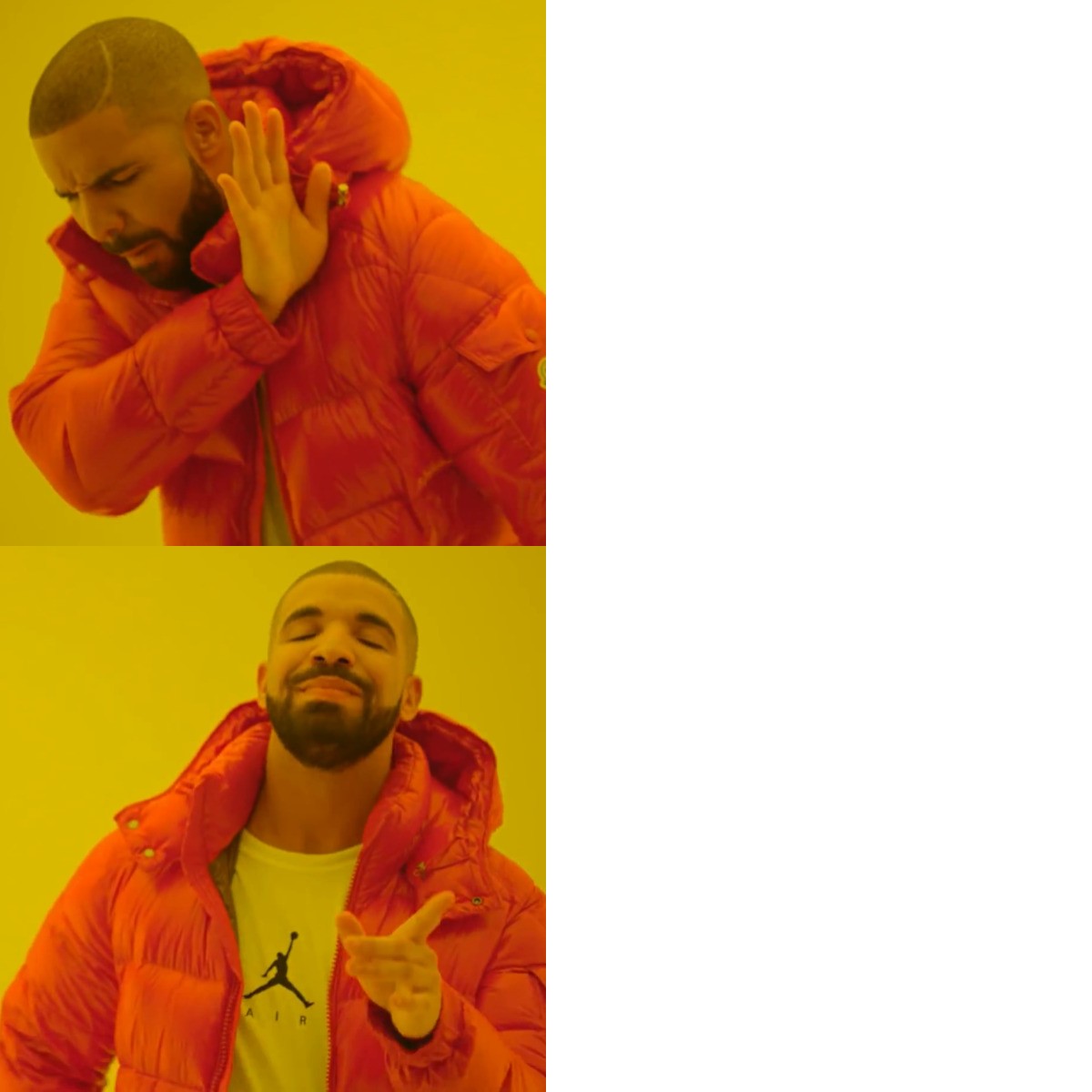
The drake hotline bling meme is one of the most iconic reaction formats in internet history. It comes from Drake's 2015 music video for "Hotline Bling," where the rapper dances through a series of neon-lit rooms. The hotline bling meme format uses two specific expressions from that video: in the first panel, the drake meme face turns away with a raised, dismissive hand — a clear "no." In the second panel, he points forward and smiles as if to say "yes." Together, those two frames form the universal drake meme yes no layout: reject one option on top, approve the other on the bottom. According to know your meme, the drake hotline bling meme rose quickly after the video premiered and has stayed relevant for years, appearing in everything from tech humour to office jokes.
A true drake hotline bling meme generator
Our drake hotline bling meme generator was built to be the fastest way to make ahotline bling meme generator output you can actually use. The two-panel editor is simple by design: a top field for the idea Drake rejects, a bottom field for the idea he approves of. Everything renders client-side in your browser, which means your text is never uploaded to a server — it never even leaves your device. That makes this both adrake hotline bling meme template blank and a full meme studio in one. Whether you want a drake hotline bling meme blank template to plan a joke later or a finished image to post right now, the generator handles both. Just clear the captions to get adrake hotline bling meme blank canvas and start over whenever inspiration strikes.
The classic hotline bling meme template works wonderfully here. This site gives you the familiar drake hotline bling meme format complete with typography controls, font selection, uppercase mode, text outline, color, and alignment. You do not have to settle for a generic drake hotline bling meme template image: fine-tune the captions so the punchline lands exactly the way you want, then export adrake hotline bling meme template high quality 1200 × 1200 PNG ready for Instagram, X / Twitter, Reddit, Discord, WhatsApp, and Slack.
How to use the drake hotline bling meme template
Using this drake hotline bling meme template takes about ten seconds. Start with adrake hotline bling meme template two panel layout — that is exactly what you get on this page. In the top panel, write the option Drake is rejecting. In the bottom panel, write the option he is choosing instead. The preview updates as you type, so you can tweak the wording until the joke feels right. When you're happy, hit Download Meme (PNG) or Copy Image and your finished hotline bling meme two panel image is ready. For people hunting for the hotline bling meme latest iterations of this format, this generator keeps the classic layout intact while making it easy to produce content that looks fresh.
Many visitors come looking for a drake hotline bling meme template clean version of the image — one with no added noise, artifacts, or watermarks. That is exactly what this tool provides: a sharp, faithful recreation of the original frames with crisp exported PNGs. Hunting for a drake hotline bling meme template origin explanation? Keep reading — the format's history is part of why it remains so effective.
The drake hotline bling meme template origin
The drake hotline bling meme template origin dates to October 2015, when Drake released the "Hotline Bling" music video. Almost immediately, the internet noticed the comedic potential of the two contrasting dance moves. By late 2015, know your meme had documented the drake hotline bling meme and the know your meme drake hotline bling meme template page had become a go-to reference for the format. The reason thedrake hotline bling meme template endured while so many other formats faded is simple: it is a universally readable yes-or-no question in a single image. Searchingknow your meme drake hotline bling meme still leads people straight to that two-panel layout — and you can now recreate it yourself in seconds.
Why our drake hotline bling meme template stands out
There are plenty of meme tools out there, but very few offer a truedrake hotline bling meme generator with this kind of polish. Here is what sets ourhotline bling meme generator apart:
- Zero watermark: every image you download is 100% clean and free of branding — a genuinely drake hotline bling meme template clean result.
- High quality export: the 1200 × 1200 PNG gives you adrake hotline bling meme template high quality image for any platform.
- Classic two-panel format: the exactdrake hotline bling meme template two panel structure that made the meme famous.
- Instant clipboard copy: grab the finished image and paste it straight into a chat or post without saving a file.
- 100% private: everything is rendered in your browser, so your captions stay on your device.
- Share links: generate a URL with your caption text baked in, perfect for sharing a drake hotline bling meme template idea with friends.
Ideas for your drake hotline bling meme
Not sure what to write? The beauty of the drake hotline bling meme is that the contrast does the work for you. A drake hotline bling meme two panelhas been used for everything from programming jokes ("copy-pasting code" vs. "actually reading the docs") to food debates and from workplace humour to relationship memes. Because thedrake hotline bling meme format is just two short lines, the possibilities are endless: anything you refuse on top and happily accept on the bottom becomes a soliddrake meme blank template moment.
A few quick tips. Keep each line short so captions read fast on mobile. Make the two lines feel parallel so the contrast is obvious. Lead with the strongest word in each caption, and use the font, outline, and size controls so the text pops against the video frames. Before you export, view the preview at the size it will actually appear on your platform. The finaldrake hotline bling meme template image should be clear at a glance, and our live preview ensures you always know exactly what you are about to share.
The drake hotline bling meme template, ready when you are
Whether you came looking for the drake hotline bling meme, a hotline bling meme, a drake hotline bling meme template, or the hotline bling meme latest trends, this page has everything in one clean tool. Start from thedrake hotline bling meme template blank, type your idea into both panels, and download a polished, high-quality two-panel meme in under a minute. No ads, no watermark, no friction.